
Add dismissible alert element In Bricks Builder Programmatically using cookies.
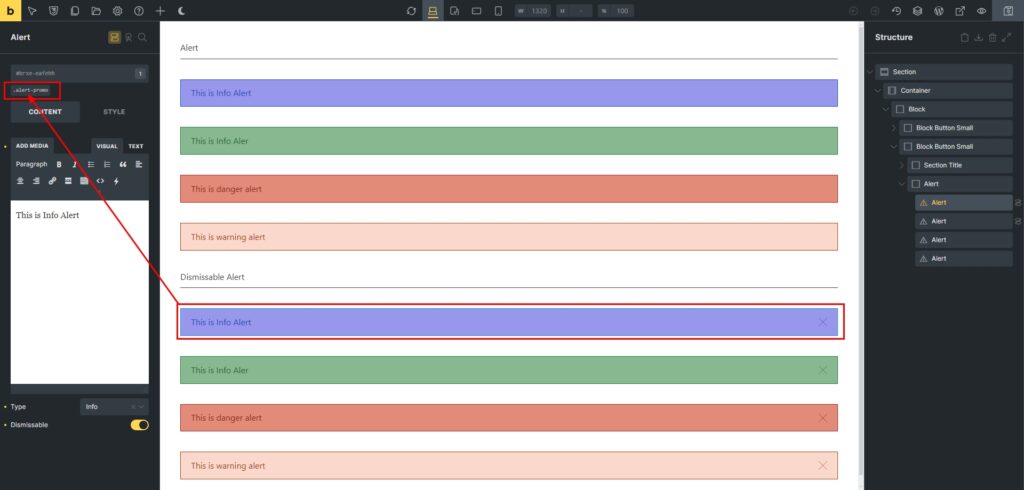
First step is to add class name to alert element. The important things is all alert element has same prefix class name eg. alert-one, alert-two etc so we can target all of those in order to make our javascript working. Dont forget to enable “Dismissable” option.
Then add this script JavaScript snippet to the footer of a WordPress site. The purpose of the script is to allow users to dismiss certain alerts (identified by their CSS class) and remember which alerts have been dismissed using cookies, so they remain dismissed even if the user navigates away from the page or revisits the site later.

To return the value of cookies so we can use those value in conditional setting of alert element by using this function below. The get_dismissed_alerts function in PHP retrieves a list of dismissed alerts from a cookie, processes it, and returns it as a comma-separated string. If no alerts are found, it returns a default value. Here’s a breakdown of what the function does:
function get_dismissed_alerts() {
    if (isset($_COOKIE['dismissed_alerts'])) {
        $dismissed_alerts = json_decode(stripslashes($_COOKIE['dismissed_alerts']), true);
        if (is_array($dismissed_alerts)) {
            return implode(', ', $dismissed_alerts); // Return as a comma-separated string
        }
    }
    return 'alert'; // Return default value as a string if no alerts found
}
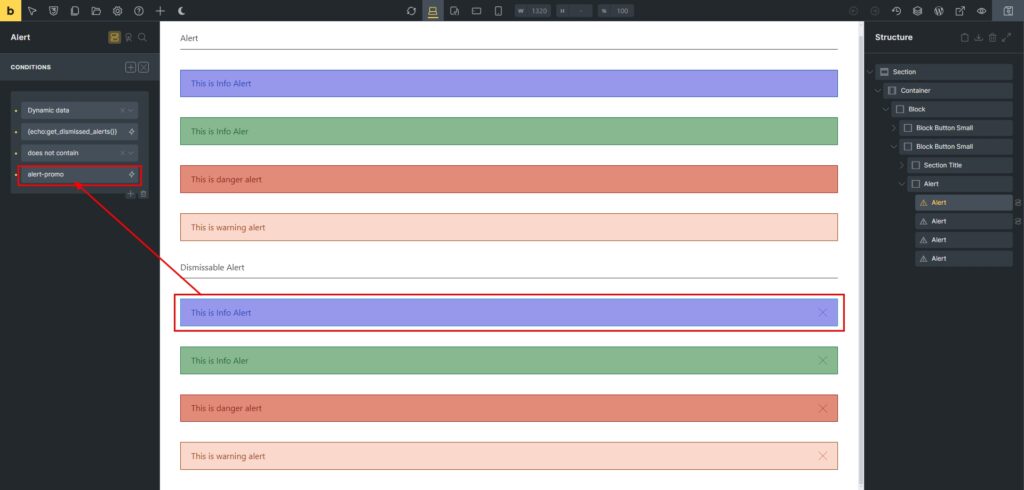
Last, set the conditional setting of alert element based on class name which found on cookies value. The value of conditonal item is must same with class name of that element.
Lastly, make sure to allow the function to executed in Bricks Builder by using this function:
add_filter( 'bricks/code/echo_function_names', function() {
  return [
    'get_dismissed_alerts',
  ];
} );