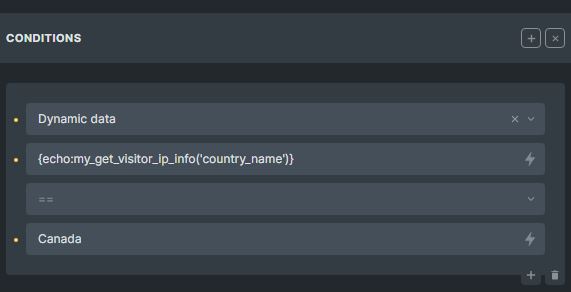
Here is how to check website visitor on wordpress then use it as conditional logic to show and hide element based on their country. In this case, i will use my local machine and add required files and code before i upload those files to my actual server.
Requirement:
- Maxmind database file
- Access to theme child folder
- Code Editor (Visual Code is recomended)
- Composer installed on your machine
Download Maxmind database file
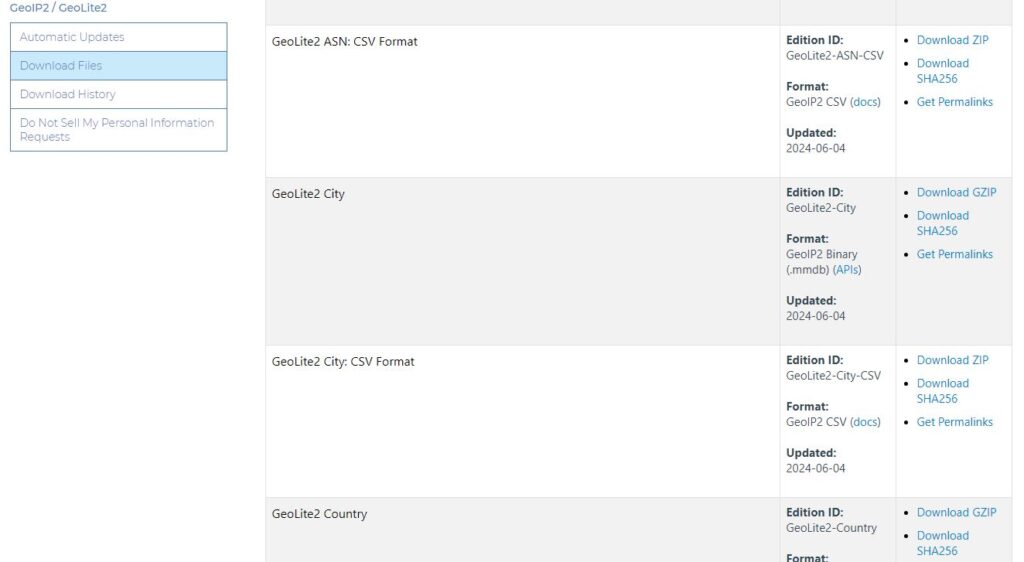
First step is to register on maxmind website to get access to database file via Accessing GeoLite2 Free Geolocation Data. After that, download the GoeLite2 Country database file as per screenshot here.
Install Composer and GEOIP2
Next is to get GeoIP2 PHP API running on our wordpress, we can install it through composer. After installed, run this command (windows user can use cmd inside theme child folder).
curl -sS https://getcomposer.org/installer | php
You will have file composer.phar in the folder. Next is Install dependencies which is GeoIP2
php composer.phar require geoip2/geoip2:~2.0
You will have folder name “vendor” with dependencies files and folders inside that.
Create function to get current visitor IP then check it based on Maxmind Database
Next step is to put your maxmind database file which has extension mmdb, usually “GeoLite2-Country.mmdb” inside /wp-content/uploads/. Then use this function to fetch the visitor IP address and check country of the IP based on the maxmind database.

To display the output of user country or country code or their IP address, use this:
echo:my_get_visitor_ip_info('country_name')
echo:my_get_visitor_ip_info('country_code')
echo:my_get_visitor_ip_info('ip')
To set conditional logic to show/hide element, please see the screenshot below: